{{ post.title }}
글 편집
글 편집 (이전 에디터)
{{ post.author.name }}
Posted on
| Version | {{ post.target_version }} | Product |
{{ product.name }}
|
|---|---|---|---|
| Tutorial/Manual | {{ post.manual_title }} | Attached File | {{ post.file.upload_filename }} |
A parametric point (PP) is a subEntity used to control various parameters more easily.
For example, if you set the stiffness (spring coefficients) of multiple springs to one PV, then you can reset all these parameters simply by modifying the PV. (You can use the Multi-Select function as well.)
In addition, PVs are variables but have fixed names.
These names can help other users who work with the model intuitively recognize the function of the PV.
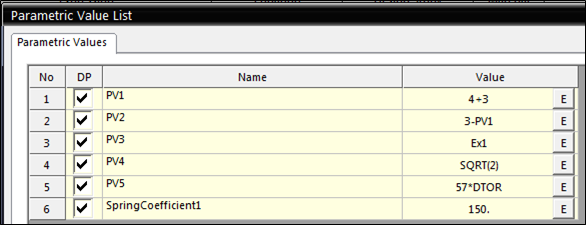
In the example model, the PV named SpringCoefficient1 sets the spring coefficient parameters of the two springs.
You can define PVsas numerical values, expressions, functions, or factors, as in the following examples: Set the numerical values in the x, y, and z components by typing, for example, PV1 = 100, 200, 300.
Use arithmetic operations to define a PV by typing, for example, PV2 = 3-PV1.
Use an expression to define a PV by typing, for example, PV3 = Ex1 (DX(Body1.MarkerOfBodyTip, Ground.BaseMarker)).
(If the PV is defined as an expression, it does not change during the simulation. The initial value calculated during pre-analysis is applied as a constant throughout the entire simulation.)
Use mathematical functions, such as SQRT, SIN, COS, or LOG, by typing, for example, PV = SQRT (2), which returns the square root of 2 (≒ 1.414).
Use factors such as DTOR or RTOD by typing, for example, PV5 = 57 * DTOR. DTOR is a factor (≒ 0.01745) used to convert a value in degrees into a radian value. 57 * DTOR returns approximately 0.995 radians.
RTOD returns the degree value of an angle in radians.