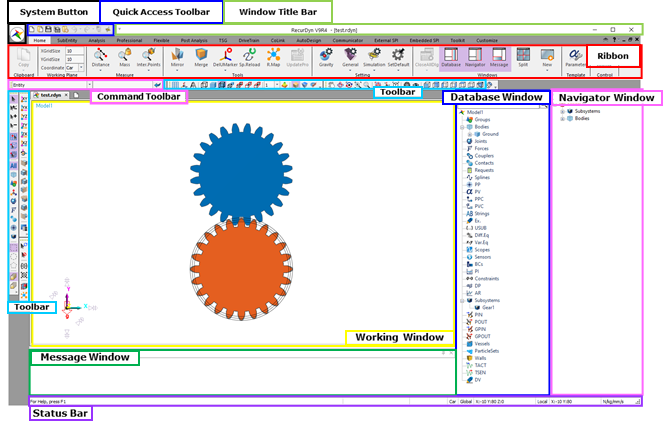
Figure1 RecurDyn Main Window
•Window Title Bar: Displays the title of current model.
•System Button: Provides the File command and the customization for the layout of main window, etc.
•Quick Access Toolbar: Provides easy access to commonly-used functions.
•Ribbon: Provides functions for common tasks.
•Command Toolbar: Sets the options for the current operation.
•Modeling Command Input Toolbar: Enters coordinates or a parametric point name and value, depending on the required input.
•View Control Tool Bar: Provides functions to perform operations and changes modes. There are the same operations that you can perform using the ribbon.
•Render Toolbar: Provides functions to give rendering effects and cut a desired plane.
•Quick Rotation Button: Rotate the view easily with mouse operation.
•Working Window: Creates the graphics of dynamic systems being modeled and animated.
•Database Window: Displays the entities of the model.
•I/O Window: Shows the modeling options, any informational message and the output data.
•Status Bar: Shows the coordinate system, the model unit and help messages.